
How to Log In to TradeLocker
TradeLocker is a trading platform that lets users access their trading accounts through a web browser, desktop app, or mobile device. If you are trying to complete your TradeLocker login, you first need to know which login method your account uses.
Some users sign in through a TradeLocker Profile with Google or Apple. Others use the email, password, and server details provided by their broker or prop firm. This guide explains both methods and shows you what to do if you cannot access your account.
TradeLocker Login Link
You can open TradeLocker directly through its official web platform:
You can also access TradeLocker through its official website at TradeLocker.com.
Before entering your details, make sure you are using the official website or app. Avoid login links shared by unknown people or websites.
How to Log In to TradeLocker
There are two main ways to sign in. Choose the method that matches how you created or received your account.
Method 1 Log In With a TradeLocker Profile
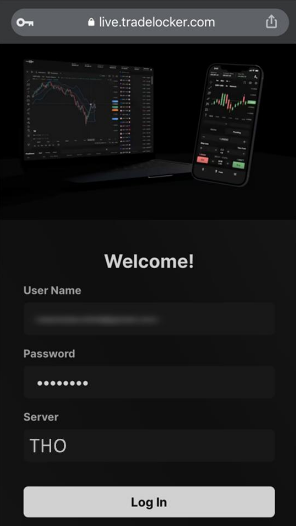
If you created a TradeLocker Profile, you can use your Google or Apple account to sign in.
Follow these steps:
- Open app.tradelocker.com.
- Select Log in with TradeLocker Profile.
- Choose Continue with Google or Continue with Apple.
- Sign in using the account connected to your TradeLocker Profile.
- Once verified, you should reach your trading platform.
Original login screen:
Image source: TradeLocker official website.
A TradeLocker Profile can also bring multiple connected broker and prop firm accounts into one place. You can switch between connected accounts without signing out each time.
Method 2 Log In With Broker or Prop Firm Details
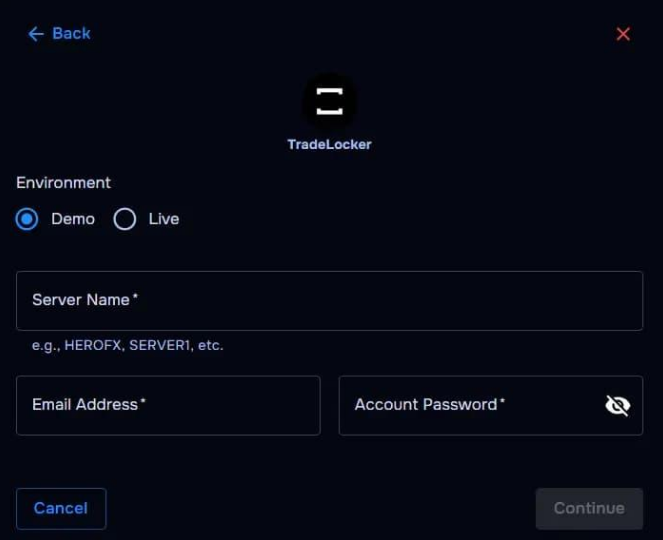
If your broker or prop firm gave you TradeLocker login details, use the Broker/Prop option instead.
Follow these steps:
- Visit app.tradelocker.com.
- Select Log in with Broker/Prop.
- Enter your registered email address.
- Enter the password provided by your broker or prop firm.
- Enter the correct server name.
- Click Log In.
Original Broker/Prop login screen:
Image source: TradeLocker official website.
You need all three details to access this type of account. Your broker or prop firm usually sends them in a welcome email after your account is created or activated. The server name is different for each provider, so always use the exact one you received.
Where to Find Your TradeLocker Login Details
If you do not know your email, password, or server, check the welcome email from your broker or prop firm.
| Login detail | Where to find it |
|---|---|
| The email used to register with your provider | |
| Password | The login email sent by your provider |
| Server | The server details in your welcome email |
If you cannot find the message, check your spam and junk folders. You can also search your inbox for your broker’s name or the words “TradeLocker account.”
Do not use a random server name from another trader. The correct server must match your own account.
How to Log In to TradeLocker on Mobile
TradeLocker also supports mobile devices. You can use its app or open the web platform through your phone’s browser.
To log in on mobile:
- Download the official TradeLocker app from the Apple App Store or Google Play Store.
- Open the app.
- Choose TradeLocker Profile or Broker/Prop login.
- Enter the details required for your account.
- Tap Log In.
You can also visit the official web platform through your mobile browser if you do not want to install the app.
How to Fix TradeLocker Login Problems
Sometimes the platform may reject your details or fail to open. Here are some common problems and ways to check them.
Wrong Email or Password
Make sure you are using the email registered with your broker or prop firm. Copy your password directly from the original welcome email because some passwords contain letters, numbers, and symbols that are easy to mix up.
Incorrect Server
A wrong server can prevent you from accessing your account even when your email and password are correct. Check the exact server name in your provider’s welcome email. If it is missing, ask your broker or prop firm to confirm it.
Forgot TradeLocker Password
For broker or prop firm accounts, the provider manages your login password. TradeLocker cannot directly recover or reset a password created by your broker.
Open your broker’s dashboard and look for its account, profile, or security settings. If you cannot change the password there, contact the provider’s support team.
TradeLocker Is Not Opening
If the login page does not load, try these basic checks:
- Refresh the page or restart the app.
- Check your internet connection.
- Update your browser or TradeLocker app.
- Clear your browser cache and cookies.
- Try opening TradeLocker on another device or browser.
If the problem continues, contact TradeLocker support or your broker, depending on the error.
Can You Log In to TradeLocker Without a Broker?
Yes. You can create a TradeLocker Profile and access its free demo environment without first opening an account with a broker or prop firm.
However, if you want to connect a broker or prop firm trading account, you must register with a provider that supports TradeLocker. That provider manages your account details and trading access.
Frequently Asked Questions
What is the official TradeLocker login website?
The official web platform is app.tradelocker.com. Always check the website address before entering your login details.
Why is my TradeLocker login not working?
The most common reasons include an incorrect email, password, or server. Check the details sent by your broker or prop firm and make sure you selected the correct login method.
Does TradeLocker use a username?
Broker and prop firm login normally requires an email address, password, and server rather than a separate username.
Can I use TradeLocker on my phone?
Yes. TradeLocker supports iOS and Android apps. You can also use its web platform through a supported mobile browser.
How do I reset my TradeLocker password?
If you use a broker or prop firm account, contact that provider or use its account dashboard to change your password. TradeLocker cannot reset passwords managed by those providers.
Is TradeLocker login free?
Creating a TradeLocker Profile and accessing its demo environment is free. However, a broker or prop firm may have its own fees, account rules, or trading requirements.
Disclaimer
This article is for informational purposes only. Always use the official TradeLocker website or app and verify account details with your broker or prop firm before signing in.